Quick answer: GMV Max is TikTok Shop’s automated ad campaign type and, since July 2025, the only way to create new ads that send shoppers to your TikTok Shop. You pick products (Product GMV Max) or a livestream (LIVE GMV Max), set a target ROI and a daily budget, and TikTok chooses the creative, audiences and placements. Results are judged on gross revenue from promoted products, including organic and affiliate orders, divided by ad cost.
TikTok Shop is now large enough that paid traffic is part of the plan for almost every serious seller. Tubefilter, citing Momentum Works and Tabcut, reported $50.3 billion in global TikTok Shop GMV in the first half of 2026, up 92% year over year, with $11.8 billion of it in the US.
Most of the paid growth on that platform now runs through one campaign type: GMV Max. This guide explains how it works in 2026, how to set it up, how to choose a target ROI and a budget, how creative and attribution work, how to read the reports, and the mistakes that waste the most money.
It is written for owners and operators who want to understand the system well enough to run it, or to hold whoever runs it accountable. Each major section links to a deeper guide in this series. If you only read one section, read the one on target ROI: that setting decides whether GMV Max spends at all, and whether the spend is profitable.
What GMV Max is, and what it replaced
GMV stands for gross merchandise value: the total value of orders before fees, returns and costs. GMV Max is TikTok’s automated campaign type for TikTok Shop that tries to maximize that number at the return you specify. TikTok describes it as a commerce automation solution, launched in 2024, that gathers your available creative, builds the campaign for you and shifts spend toward the content that sells.
The bigger change came in July 2025. TikTok made GMV Max the default and only supported campaign type for TikTok Shop Ads. If you choose the Sales objective with TikTok Shop as the destination, you can no longer create, edit or duplicate Video Shopping Ads, Product Shopping Ads or LIVE Shopping Ads. Existing campaigns in those formats were allowed to keep running, and Ads Manager shows an “Upgrade now” option that moves them to GMV Max using their historical ROI as the starting target.
| Topic | Manual Shop Ads (before July 2025) | GMV Max (now) |
|---|---|---|
| Campaign build | You built ad groups, audiences, bids and creative rotation | The system creates and pauses ads automatically |
| Creative | The ads you uploaded or authorized | A pool of account videos, authorized affiliate posts, Spark Ads posts and product cards |
| Placements | Chosen per campaign | Feed, search, Shop Tab and TikTok Ad Network, chosen automatically |
| Your main input | Targeting, bids and optimization goal per campaign | A target ROI and a daily budget |
| What counts as a result | Orders attributed to the ad | Paid, organic and affiliate orders on promoted products |
Two narrow exceptions remain, according to TikTok’s migration notes. You can still create LIVE Shopping Ads by selecting a TikTok identity (not an official or marketing account) rather than a shop, and you can still run Video Shopping Ads with Showcase as the destination. For a seller promoting their own TikTok Shop, GMV Max is the tool.
How GMV Max works
Think of GMV Max as a contract. You give TikTok three things: what to promote, the minimum return you will accept, and how much you are willing to spend per day. TikTok decides almost everything else.
| You control | TikTok automates |
|---|---|
| Which products, or which LIVE account, to promote | Which videos and product cards run |
| Target ROI | Bids in each auction |
| Daily budget and schedule | Audience selection |
| Creative supply: what videos exist and are authorized | Placements across feed, search, Shop Tab and TikTok Ad Network |
| Exclusions of specific videos | Creating new ads and pausing weak ones |
| Optional modes: Max delivery, Promotion days, Creative boost | Pacing spend across the day |
It optimizes total channel ROI, not ad only ROI
Older formats judged an ad by the orders it drove. Product GMV Max optimizes what TikTok calls total channel ROI: orders for promoted products are attributed to the campaign whether the buyer came from a paid impression, an organic video or an affiliate post. TikTok’s help center puts it simply: Product GMV Max optimizes the shop’s total nonLIVE ROI, while LIVE GMV Max maximizes LIVE GMV.
That changes how you read results. A GMV Max ROI of 4.0 does not mean each ad dollar created four dollars of new sales. It means promoted products sold four dollars of gross revenue for every dollar spent, including some sales that would have happened anyway. The attribution section below shows how to adjust for that.
It optimizes by the day
GMV Max prioritizes hitting your ROI across a full day, so hour to hour swings are expected. TikTok recommends letting a campaign run at least a full day before judging it, and its ROI protection rules are built around daily results.
It builds ads from everything you have
The creative pool includes videos with product anchor links from connected TikTok accounts, Spark Ads posts added to the ad account, authorized affiliate posts and product cards. TikTok’s May 2026 business blog also describes shoppable carousel ads and auto generated product videos, and says no creative minimum is required to start. GMV Max also aims to lift organic reach for seller and affiliate videos that feature promoted products.
Where it is heading
The same TikTok blog says GMV Max is expanding to account for business costs beyond ad spend, including affiliate commissions, coupons and referral fees, and that campaigns in Ads Manager are labeled Good, Fair or Poor with guidance attached. TikTok also reports that advertisers using GMV Max saw a 20% uplift in GMV, based on its internal 2025 data. Treat platform reported averages as directional; TikTok’s own disclaimer notes that results vary.
Product GMV Max vs LIVE GMV Max
There are two campaign types. Product GMV Max promotes products through video and product card ads and runs continuously. LIVE GMV Max promotes a livestream and sends viewers into the LIVE room while you are on air.
| Feature | Product GMV Max | LIVE GMV Max |
|---|---|---|
| What it promotes | Selected products, or all products | One TikTok account’s LIVE room |
| Optimizes for | Total nonLIVE ROI of promoted products | Gross revenue of the LIVE event |
| Creative | Account videos, affiliate posts, Spark Ads posts, product cards | Video to LIVE (videos that drive to the stream) and LIVE to LIVE (the stream itself) |
| ROI measured as | Gross revenue of promoted products divided by cost | Total LIVE room GMV divided by total ad spend |
| When it delivers | Continuously | Only while the account is live |
| Fits best | Most shops, most of the time | Shops that stream on a regular schedule |
Check availability before you plan around LIVE. TikTok’s Product GMV Max setup article lists the United States among supported markets. Its LIVE GMV Max setup articles, updated as recently as September 2026, list Indonesia, Malaysia, the Philippines, Thailand, Vietnam and Singapore, while TikTok’s May 2026 blog says GMV Max is live in every TikTok Shop market. If you sell in the US, look for the “Promote LIVE” option under Shop Ads in your own Seller Center.
For most shops the right order is Product GMV Max first, then LIVE once you stream consistently. The full comparison, including how to run both, is in our Product GMV Max vs LIVE GMV Max breakdown.
Before you launch: a readiness checklist
Most weak GMV Max launches are decided before the campaign exists. Work through this list first.
- Shop connected to Business Center. Your TikTok Shop must be connected to a TikTok Business Center. For agencies and partners, TikTok requires the ad account, the TikTok accounts and the shop to sit in the same Business Center.
- Authorization and permissions. The ad account needs GMV Max authorization for the shop. The person building the campaign needs Admin or Advertising Manager permission; agencies need ad promotion access to the shop plus operator or admin access to the ad account.
- No conflicting campaigns. Products that sit in an active Video Shopping Ads, Product Shopping Ads or other GMV Max campaign must be removed from it, or that campaign closed, before you can add them.
- Listings that convert. Clear titles, good images, accurate attributes and a competitive price. GMV Max amplifies a listing; it does not repair one.
- Inventory. Enough stock to absorb a sales lift. Running out mid campaign throws away what the system has learned.
- Unit economics. A known breakeven ROI for each product you plan to promote (explained below). Without it you cannot set a target.
- Creative. Some product anchored videos on your account, plus affiliate videos you can authorize. TikTok says there is no minimum, but more eligible videos give the system more to test.
How to set up a Product GMV Max campaign
Here is the flow in TikTok Ads Manager, based on TikTok’s June 2026 help article:
- Click GMV Max at the top of the dashboard and choose the shop. If it does not appear, check the Business Center connection, your permissions and the shop’s region.
- Click Create GMV Max ads, then Promote products. A greyed out button usually means missing access or authorization.
- Choose Promote all products or add specific products. Promoting all products turns off Video Shopping Ads and Product Shopping Ads across all ad accounts for the shop. Promoting selected products turns them off for those products only.
- Set the ROI target: accept the recommendation or enter your own.
- Set the daily budget: accept the recommendation or enter your own.
- Pick a start date and time. The campaign then runs continuously.
- Click Publish.
You can also create and monitor campaigns in Seller Center under Shop Ads (in the US, open Marketing first). Promotion days can be switched on during creation in Seller Center.
All products or selected products?
TikTok’s best practices recommend including as many products as possible and prioritizing products that already sell, because they produce more measurable lift. That is sound advice with one condition: margin. If a product’s breakeven ROI is 5.0 and the campaign target is 3.0, the system can sell that product at a loss while the campaign looks healthy. Include products whose breakeven ROI sits comfortably below the target you plan to run, and leave the rest out until their economics improve.
Target ROI: the setting that decides everything
Target ROI is the return you ask GMV Max to deliver, measured as gross revenue divided by ad cost. Set 4.0 and TikTok bids to bring in roughly $4 of gross revenue for each $1 of spend across the day. Set it too high and the campaign cannot find enough auctions at that return, so it barely spends. Set it too low and it spends freely but may lose money on every order.
Step 1: find your breakeven ROI
Breakeven ROI is the ROI at which ad spend uses up all of your profit per order. The formula is short:
Breakeven ROI = selling price ÷ contribution per order before ads
Contribution is what is left from each order after every variable cost except advertising. Here is a worked example for a $40 product. The referral fee uses TikTok’s listed rate for most categories. The commission rate is an illustration, and creators on custom commissions change it, so swap in the figures from your own Seller Center and affiliate plans.
| Line item (per order) | Amount |
|---|---|
| Selling price | $40.00 |
| Landed product cost | -$9.00 |
| Referral fee (6%, TikTok’s listed rate for most categories) | -$2.40 |
| Fulfillment and shipping you pay | -$6.50 |
| Affiliate commission (15% on the 40% of orders that come through affiliates, so 6% blended) | -$2.40 |
| Returns and refunds allowance (3%) | -$1.20 |
| Packaging and other variable costs | -$0.70 |
| Contribution before ads | $17.80 (44.5% of price) |
| Breakeven ROI | $40 ÷ $17.80 = 2.25 |
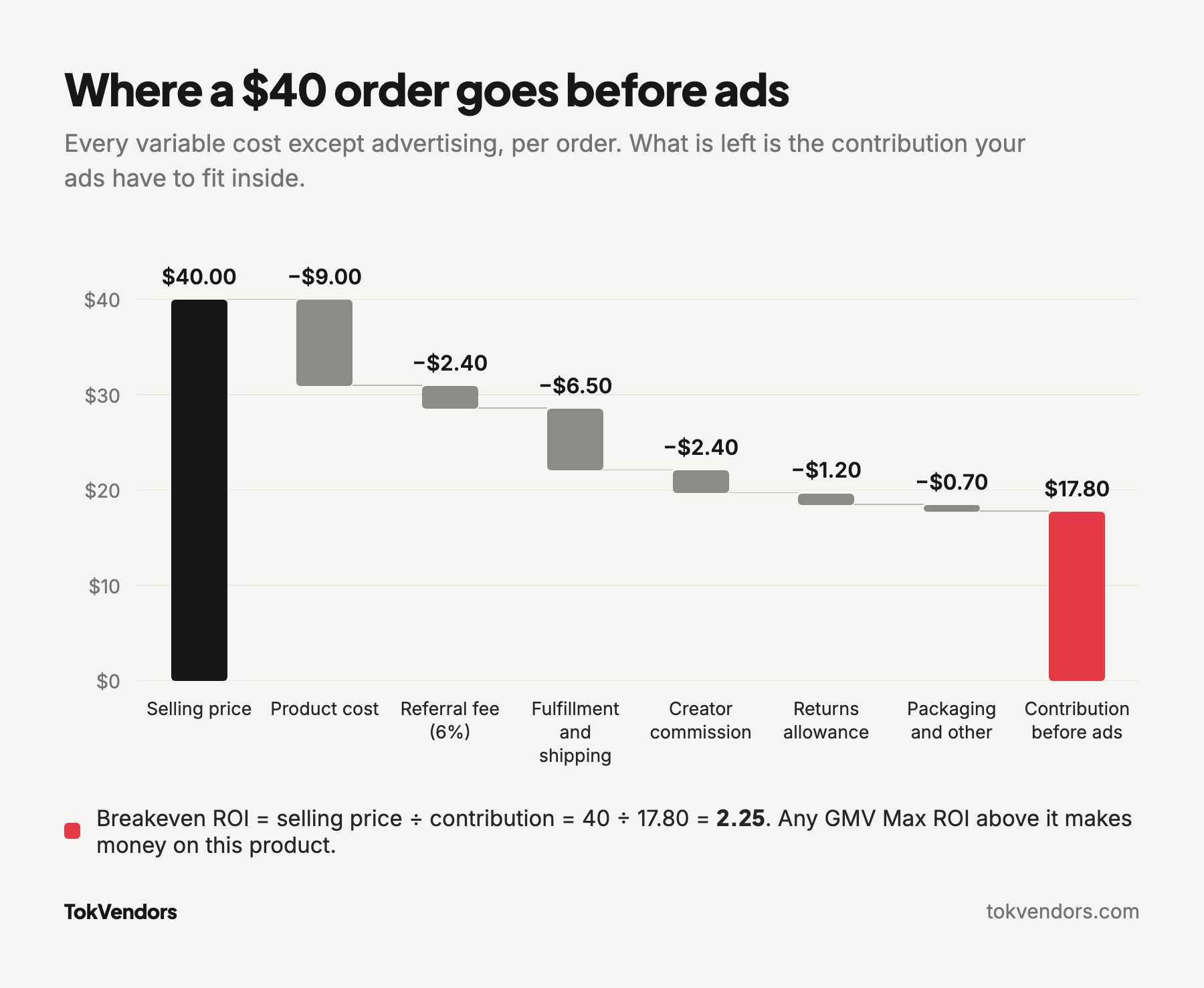
At an ROI of 2.25 you spend $17.80 of ads per $40 order and keep nothing. Below it, every order loses money. Above it, you make money.
Step 2: add the profit you want
To build a profit margin into the target, use this version:
Target ROI = 1 ÷ (contribution margin − desired profit margin)
With a 44.5% contribution margin, a 10% profit target gives 1 ÷ (0.445 − 0.10) = 2.90. A 15% target gives 1 ÷ 0.295 = 3.39. Check the first one: at ROI 2.90, ad cost per $40 order is $13.79, leaving $4.01, which is 10% of the price.
Step 3: compare with TikTok’s recommendation
TikTok’s own best practice is that the recommended ROI equals historical nonLIVE GMV divided by historical ad cost, and it suggests using the recommendation or setting slightly lower. Its ROI recommendations are built from similar products, shown at several competitiveness levels and updated daily. More competitive (lower) targets generally buy more spend and GMV; less competitive (higher) targets limit both.
If TikTok recommends 2.6 and your 10% profit target is 2.90, you have a real decision: accept thinner margin for scale, or accept slower spend for profit. If the recommendation sits below your breakeven, the product likely needs a better offer, better creative or a higher price before ads can work.
How often to change it
TikTok advises keeping each ROI setting for at least three full days before adjusting, because frequent changes disrupt learning. Changes also interact with ROI protection: on Product GMV Max, raising the target, or lowering it more than once in a day, makes that day ineligible for credits. The full method, with more worked numbers, is in our guide on how to set and adjust your GMV Max target ROI.
Want a second opinion on your numbers?
TokVendors builds breakeven ROI models for each product and runs GMV Max against them day to day, so targets are set from your margins rather than guesses.
Budgets: how much to spend, and when to scale
Budget in GMV Max is a ceiling, not a promise. The campaign only spends as much as it can at roughly your target ROI. That gives you two levers that behave differently: the target decides how hard the system bids, and the budget decides how far it can go.
TikTok’s starting formula
TikTok’s best practices give a recommended daily budget of 2 × historical nonLIVE GMV ÷ ROI target. Since the budget is daily, use average daily GMV. A shop doing $1,500 a day in nonLIVE GMV with a target of 3.0 would start at 2 × 1,500 ÷ 3 = $1,000 a day. A new shop with no history should start with the recommended ROI and budget shown in the setup flow.
TikTok also advises keeping budget consumption below 80% and raising budgets as performance improves. In plain terms: if the campaign spends more than about 80% of its budget, the budget has become the constraint, and it may be holding back sales the system could make at your target.
Scale budget before you touch ROI
When a campaign is profitable and spending close to its cap, raise the budget first. Raising the target at the same time can stall delivery, because you are asking for more volume at a harder return. A calm ramp looks like this:
| Signal over 3 full days | Action |
|---|---|
| ROI at or above target, spend above 80% of budget | Raise budget by a moderate step (for example 20% to 30%) |
| ROI at or above target, spend well below budget | Leave budget alone; add creative or lower target slightly if you want more volume |
| ROI below target but above breakeven | Hold settings; check creative and listing before changing anything |
| ROI below breakeven for several days | Fix the offer or creative, or raise the target once and accept lower spend |
Max delivery: for short pushes, not every day
Max delivery is an optional mode inside a GMV Max campaign. It adds a separate budget for selected products or LIVE rooms and aims to spend it fully for the highest possible revenue, without the ROI constraint. During the Max delivery window only that separate budget is spent, the product returns to Target ROI when the window ends, and pacing is prorated if you start partway through a day.
TikTok positions it for launches, clearing inventory and peak events, and suggests new advertisers can run it for 5 to 7 days to build early traffic before switching to Target ROI. The trade off: ROI can swing, and campaigns with products or LIVE rooms using Max delivery are not covered by ROI protection.
Promotion days: plan peak periods in advance
Promotion days is a GMV Max setting for shopping peaks. When enabled, the system lowers your ROI goal by 10%, 20% or 30% and raises budgets by 50% by default during the promotion window. The promotional ROI is based on the lower of your average ROI over the last 7 nonpromotional days or the ROI you entered. TikTok recommends turning it on 3 to 5 days ahead so the system can learn, and refreshing creative before the event.
Smaller budgets
TikTok’s 2026 blog also describes Seller Scale Up, a simplified GMV Max experience for smaller budgets: you choose products and set a seven day budget, and the system moves funds between ad spend and coupons. If you see it in your account, it can be a sensible first step before a full campaign.
For a deeper walkthrough of starting budgets, pacing and when to scale, read our guide to setting your GMV Max budget.
ROI protection: what it covers
Since February 25, 2026, GMV Max campaigns can receive automatic ad credits when they miss their ROI target on a qualifying day. The two core conditions are that campaign ROI falls below 90% of the daily target ROI, and that the campaign records more than 20 orders that day.
The credit is calculated as total cost − (total gross revenue ÷ (daily ROI target × 0.9)). Example: target 3.0, cost $1,000, gross revenue $2,400 and 85 orders. ROI was 2.4, below 2.7 (90% of 3.0), so the credit is $1,000 − ($2,400 ÷ 2.7) = $111.11. Net cost becomes $888.89, which works out to an effective ROI of 2.7.
The exclusions matter as much as the rule. Days with a manual target increase (or more than one decrease) on Product GMV Max, more than two manual target changes on LIVE GMV Max, pauses, deletions, product edits, Max delivery, Creative boost budgets, LIVE viewer boost budgets and suspensions are not covered. Credits are added automatically, you can see a 60 day history in the campaign list, and TikTok can revoke credits for unusual activity or policy violations. We cover every condition and how to keep days eligible in our GMV Max ROI protection explainer.
Creative: the fuel GMV Max runs on
With targeting and bidding automated, creative is the main lever you still control. The system can only scale what it has to show, and it learns faster when it has more good options.
Where the videos come from
- Your TikTok accounts. Videos with product anchor links from accounts connected to the shop. You can link additional TikTok accounts to widen the pool.
- Spark Ads posts. Spark Ads run an existing organic post as an ad. Posts authorized with a creator’s video code can be added to the Creative Library.
- Affiliate posts. Videos made by affiliate creators that they have authorized for ads. Choose “Affiliate post” as the video source and authorized affiliate videos featuring your selected products are included automatically.
- Product cards and generated formats. Product card ads, carousels and auto generated product videos, depending on availability in your account.
TikTok recommends the auto select video mode, which explores all existing and future eligible videos with no cap, over picking videos by hand. It also notes that affiliate videos often perform better and lift incremental GMV.
Affiliate content and authorization
To use affiliate videos, you need a collaboration with the creator (for example an Open Collaboration in Seller Center, with commission rates set per product) and the creator’s authorization. Creators can authorize all their affiliate posts at once or share a video code for a single post. If a specific video does not appear in your campaign, request authorization or add it with the video code under the TikTok post source.
Two limits are worth knowing. You cannot change the product link on an affiliate post, and if the affiliate collaboration ends, ads using that creator’s videos pause. Some sellers are also invited to set a separate Shop Ads commission rate, between 1% and 80%, for orders that come from ads using affiliate posts. Affiliate videos used in GMV Max receive a commercial content label. Building the creator side of this machine is covered in our TikTok Shop affiliate marketing guide.
Volume and testing
TikTok publishes firm numbers for LIVE: at least 50 to 70 videos in the “In queue” status, or 5 to 10 new videos a day, for stable creative exploration. For Product GMV Max it gives no minimum, but it is clear that more product anchored videos mean more GMV potential, and that a varied pool helps the system find winners.
Inside the campaign, each video moves through stages that TikTok labels along the lines of in queue, learning or in exploration, delivering, and ineligible. Two tools help with testing: “Accelerate testing for new videos” for newer creatives, and Creative boost, which gives a chosen video extra budget where available. Bulk exclusion filters let you remove up to 200 videos from paid traffic by caption keyword, posting date or affiliate handle. Our GMV Max creative guide covers volume, briefs and a weekly test rhythm.
Attribution: what GMV Max counts
Attribution is where most confusion about GMV Max starts. Here is what TikTok’s documentation says the campaign counts:
- Window. Same day orders with a one day attribution window.
- Scope. Only orders for promoted products. Orders for products outside the campaign still happen, but they are not campaign GMV.
- Sources. Orders for promoted products from organic content and affiliate videos count toward the campaign, alongside paid orders.
- Gross revenue. The amount buyers pay, minus sales tax, plus product discounts provided to them. Discounts are added back, so revenue is closer to list price than to what you actually receive.
- LIVE. LIVE ROI is total LIVE room GMV divided by total ad spend, with real time attribution at the LIVE room level.
Reported ROI vs incremental ROI
Because organic and affiliate orders count, reported ROI is higher than the true incremental return of your ads. A simple example: before GMV Max, the promoted products sold $700 a day without ads. With GMV Max, the campaign reports $2,400 of gross revenue on $800 of spend, an ROI of 3.0. If the $700 baseline still happened, the ads added $1,700, an incremental ROI of about 2.13. With the $40 product above, that is below the 2.25 breakeven, even though the dashboard shows 3.0.
The baseline is not fixed, because GMV Max also pushes organic reach. TikTok’s own suggestion is to compare total shop GMV before and after activation. Enrich Labs suggests a holdout set of products or a time split, and warns against comparing GMV Max ROI to a seven day click report from another ad platform. The practical habit is to watch total shop GMV and total contribution, not only the campaign ROI.
Discounts distort the picture
If you fund a 15% discount on that $40 product, the buyer pays $34, but gross revenue still records about $40. Recalculating the costs on the lower price, contribution falls to roughly $12.70, and the breakeven ROI in reported terms rises from 2.25 to about 3.15 ($40 ÷ $12.70). Run promotions and targets as one decision, not two.
Reporting: what to look at, and how often
You can see GMV Max results in Seller Center (Shop Ads, under Marketing in the US, then View details) or in the GMV Max tab in TikTok Ads Manager. The overview shows Cost, Orders (SKU), Cost per order, Gross revenue and ROI. Below that, the product and creatives report breaks results out by product and by video.
One subtlety: Cost per order and ROI at product and video level include organic orders, so a product with high spend can look worse than it is. TikTok recommends judging products and videos mainly by Gross revenue. Video reports also show statuses such as In Queue, Learning, Delivering, Authorization Recommended (a video that generated orders but is not authorized for ads), Boosting and Boosted, plus view through and click metrics.
| Cadence | What to check | What it tells you |
|---|---|---|
| Daily | Spend vs budget, ROI vs target, orders, stock on promoted products | Whether the campaign is delivering and whether anything is broken |
| Daily | ROI protection status and any credits | Whether yesterday qualified and why |
| Weekly | Product level gross revenue, top and bottom videos, “Authorization Recommended” videos | Where to add creative, which videos to authorize, which products to drop |
| Weekly | Spend share by product vs margin by product | Whether spend is drifting toward low margin items |
| Monthly | Total shop GMV, total contribution after ads and credits, incrementality check | Whether GMV Max is growing the business, not just the dashboard |
If you use Max delivery, filter reports by optimization mode and pick a date range that covers the Max delivery window, otherwise its results blend into your Target ROI numbers.
The most common GMV Max mistakes
- Setting a target from a wish. A target of 6.0 because it sounds safe, with no link to margins. Start from breakeven and TikTok’s recommendation.
- Raising the target to fix profit. Higher targets often just cut spend. Check creative, price and listing first.
- Changing settings every day. TikTok’s guidance is at least three full days per ROI setting. Daily changes reset learning and can void ROI protection.
- Judging at noon. GMV Max optimizes to the full day. Morning results are not the verdict.
- Starving creative. No new product anchored videos and no affiliate authorizations means the system runs out of things to test.
- Mixing margins. Promoting a low margin product in a campaign whose target only works for high margin products.
- Reading reported ROI as incremental. Organic and affiliate orders inflate it. Track total shop contribution.
- Ignoring discounts. Gross revenue adds back discounts, so heavy promotions raise your real breakeven.
- Forgetting other ad accounts. Promoting all products turns off Video and Product Shopping Ads across every ad account for the shop. Coordinate with anyone else running ads.
- Testing on protected days. Product edits, Max delivery and target increases all remove ROI protection for that day. Batch them.
If your campaign is live but barely spending, the causes are usually a target above what the auction can reach, thin creative, or product and account setup issues. Our checklist for GMV Max campaigns that are not spending walks through nine of them with fixes.
A 30 day GMV Max launch plan
Before launch. Confirm Business Center, authorization and permissions. Clean up listings and stock. Build a breakeven ROI for each product. Collect existing videos and request authorization from affiliates who have already posted.
Week 1. Launch Product GMV Max on the products with proven sales and healthy margins. Use TikTok’s recommended ROI, or your 10% profit target if it is close, and the recommended budget. Do not change the target for the first three full days. Check daily that spend, orders and stock look sane.
Week 2. Read the first full stretch of data. If spend is far below budget and ROI is well above target, lower the target once, in a modest step. If spend is near budget and ROI holds, raise the budget. Authorize any video flagged “Authorization Recommended.”
Week 3. Add creative. Brief creators on the hooks and angles that are working, post new product anchored videos, and exclude anything off brand. Consider adding products whose economics now fit the target.
Week 4. Step back. Compare total shop GMV and contribution with the period before launch. Reconcile campaign cost against ROI protection credits. Decide on the next month: scale budget, adjust the target, add LIVE, or plan Promotion days for upcoming events.
Running GMV Max yourself, or with a partner
GMV Max removes a lot of manual campaign work, but it does not remove judgment. Someone still has to set targets from real margins, keep creative flowing, manage affiliate authorizations, avoid voiding ROI protection, and check whether the ads are growing the business. Many owners do this well themselves once they understand the levers in this guide.
If you would rather have it handled, our GMV Max management service covers target setting, budgets, creative supply and reporting as part of running your shop. A free strategy call is the easiest way to see whether it fits: book a time here, or email [email protected].
Frequently asked questions
Is GMV Max mandatory for TikTok Shop ads?
Since July 2025, GMV Max has been the default and only supported campaign type when you advertise with the Sales objective and TikTok Shop as the destination. Older Video Shopping Ads, Product Shopping Ads and LIVE Shopping Ads campaigns could keep running, but new ones cannot be created for a shop. LIVE Shopping Ads through a TikTok identity and Video Shopping Ads to Showcase remain as narrow exceptions.
What is a good ROI for GMV Max?
A good ROI is one above your breakeven ROI, which is your selling price divided by contribution per order before ads. A product with a 40% contribution margin breaks even at an ROI of 2.5, so a target around 3.0 to 3.5 leaves room for profit. Compare that with TikTok’s recommended ROI before you launch.
How long does GMV Max take to learn?
TikTok does not publish a fixed learning period for GMV Max. It optimizes ROI by the day and advises keeping each ROI setting for at least three full days before adjusting. For LIVE GMV Max it recommends running at least three days before judging results.
Does GMV Max count organic and affiliate sales?
Yes. Orders for promoted products from organic content and affiliate videos are attributed to Product GMV Max, alongside paid orders, using same day orders and a one day attribution window. Orders for products outside the campaign are not counted as campaign GMV.
Can I run GMV Max on a small budget?
Yes. TikTok says no creative minimum is required, and it describes Seller Scale Up as a simplified GMV Max option for smaller budgets with a seven day budget. Keep in mind that ROI protection only applies on days with more than 20 campaign orders, so very small campaigns rarely qualify.
Sources
- GMV Max: Your TikTok Shop growth engine, TikTok For Business, May 13, 2026
- About GMV Max migration for TikTok Shop Ads, TikTok Business Help Center, updated March 2026
- About Product GMV Max, TikTok Business Help Center, updated September 2026
- How to create a Product GMV Max campaign in TikTok Ads Manager, TikTok Business Help Center, updated June 2026
- Best practices for Product GMV Max, TikTok Business Help Center, updated June 2026
- GMV Max: Maximize total sales with minimal effort, TikTok Business Help Center, updated May 2025
- About LIVE GMV Max, TikTok Business Help Center, updated September 2026
- How to create a LIVE GMV Max campaign in Seller Center, TikTok Business Help Center, updated September 2026
- Best practices for LIVE GMV Max, TikTok Business Help Center, updated September 2026
- About ROI recommendation for GMV Max campaigns, TikTok Business Help Center, updated March 2026
- About ROI protection for GMV Max campaigns, TikTok Business Help Center, updated September 2026
- About Max delivery optimization for GMV Max, TikTok Business Help Center, updated March 2026
- How to turn on Max delivery optimization for products in your Product GMV Max campaign, TikTok Business Help Center, updated June 2026
- About Promotion days for GMV Max, TikTok Business Help Center, updated March 2026
- About affiliate creatives for TikTok Shop Ads, TikTok Business Help Center, updated March 2026
- About setting different affiliate commission rates for TikTok Shop Ads, TikTok Business Help Center, updated March 2026
- How to improve creative exploration in Product GMV Max, TikTok Business Help Center, updated October 2026
- About bulk creative exclusion filters for Product GMV Max, TikTok Business Help Center, updated June 2026
- How to view reporting for your Product GMV Max campaign, TikTok Business Help Center, updated June 2026
- How to request GMV Max authorization for TikTok accounts, TikTok Business Help Center, updated March 2026
- TikTok Shop Ads: Complete Guide 2026, Enrich Labs, 2026
- Led by U.S. sales, TikTok Shop is on track to hit $100 billion of gross merchandise value in 2026, Tubefilter, August 6, 2026